storage snapshot
What is a storage snapshot?
A storage snapshot is a set of reference markers for data at a particular point in time (PIT). More specifically, it's a collection of saved application data and a comprehensive log that details how the saved data has changed over time. When these two elements are taken together, the storage snapshot lets an enterprise protect an application's data in real-time. It minimizes the recovery point objective (RPO) while allowing workload managers to restore, or roll back, the application's data state to any previous PIT where a storage snapshot is available.
A storage snapshot, also called a snapshot, is a form of data backup used to provide versatile and responsive data protection for individual enterprise applications. As an application's data changes over time, storage snapshots periodically capture and record the data changes, producing a record of changes and new data. A snapshot may be taken at almost any frequency but generally ranges from 24 hours to as little as several minutes depending on the replication and recovery needs of the business and the application.
When trouble arises with the application's data, application owners can restore the latest snapshot to recover the last application state. This approach minimizes RPO, downtime and data loss. Application owners also have the option to recover previous restore points that would restore the application to an earlier state as desired. This can be an important feature for workloads suffering data corruption or malicious activity because it lets administrators restore the application to a point before the problem occurred.
How storage snapshots work
Storage snapshots are often based around the idea of change, which is also referred to as delta or differencing. Snapshots often use a differencing disk, which is a special type of virtual hard disk that's linked to a parent virtual hard disk.
This article is part of
What is data protection and why is it important?
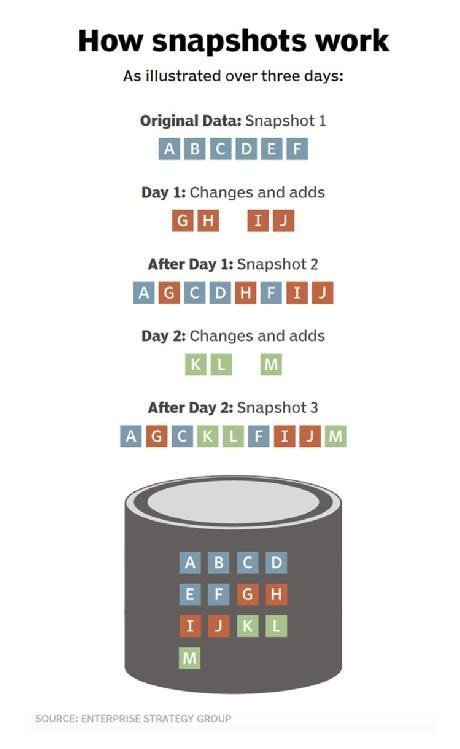
Any storage snapshot starts with a complete backup of the workload's current data state. This represents a complete backup of the application's data just like any full application data backup. After the initial full backup, what makes a snapshot special is its treatment of data changes over time.
Once an initial backup is created, the storage snapshot system captures and records the changes that take place to the application's data, that is, the differences or deltas in the data. Only those changes are recorded and logged at that PIT. This behavior makes each subsequent snapshot backup extremely small and fast, and it's ideal for data protection where small RPOs are desirable.
When an administrator creates a storage snapshot, the underlying system creates a differencing disk that's bound to the original virtual hard disk. All future write operations are directed to the differencing disk, leaving the original virtual hard disk in an unaltered state. The file system is completely unaware of the existence of a differencing disk and continues to function just as it would on a physical machine.
Snapshots have parent-child relationships and form a tree structure. Each snapshot taken creates another branch of the tree. In effect, snapshots eventually build a complex index of an application's data that details the ways that data changed at every captured PIT.
Snapshots are generally created for data protection, but they can also be used for testing application software and data mining. A storage snapshot can be used for disaster recovery when information is lost due to human error or when any event that damages or deletes data occurs. Snapshots can also be useful for reverting a system back to a previous state -- for example, if a bad patch has been installed.
Storage snapshots have a finite lifecycle. Each snapshot is time sensitive and loses value over time. For example, if a system is capturing snapshots every 30 minutes, it's unlikely that snapshots captured 24 or even 48 hours ago will be useful to the business. Consequently, snapshots are periodically re-integrated into a single complete backup, and the snapshot process starts again from the beginning with a new differencing activity. This reduces snapshot data storage demands and prevents unexpected damage or corruption on the differencing disk that could prevent proper PIT restorations.
Types of snapshot technology
Not all snapshots are based on differencing disks. There are other types of storage snapshots that use different mechanisms or approaches.
Copy-on-write snapshots
Copy-on-write snapshots store metadata about the location of the original data without copying it when the snapshot is created. These snapshots are created almost instantly, with little performance effect on the system taking the snapshot. This enables the rapid recovery of a system in the event of a program malfunction or a malicious event.
The data in a copy-on-write snapshot is consistent with the exact time the snapshot was taken, hence the name copy on write. However, all previous snapshots must be available if complete archiving or recovery of all the data on a network or storage medium is required. Every copy-on-write process requires one read and two writes; data must be read and written to a different location before it's overwritten.
Clone or split-mirror snapshots
Clone or split-mirror snapshots reference all the data on a set of mirrored drives. Each time the utility is run, it creates a snapshot of the entire volume, not only new or updated data. This makes it possible to access data offline and simplifies the process of recovering, duplicating and archiving all the data on a drive. This is a slower process, and each storage snapshot requires as much storage space as the original data.
Copy-on-write with background copy
Copy-on-write with background copy takes snapshot data from a copy-on-write operation and uses a background process to copy the data to the snapshot storage location. This process creates a mirror of the original data and is considered a hybrid between copy-on-write and cloning.
Redirect-on-write storage snapshots
Redirect-on-write storage snapshots are similar to copy-on-write ones, but write operations are redirected to storage that's provisioned for snapshots, eliminating the need for two writes. Redirect-on-write snapshots write only changed data instead of a copy of the original data. When a snapshot is deleted, that data must be copied and made consistent on the original volume. The creation of additional storage snapshots complicates original data access along with the snapshot data.
Incremental
Incremental snapshots create timestamps that let a user go back to any PIT. Incremental snapshots can be generated faster and more frequently than other types of storage snapshots. Because they don't use much more storage space than the original data, they can be kept longer. Each time an incremental snapshot is generated, the original snapshot is updated.
VMware snapshots
VMware snapshots copy a virtual machine disk file and restore a VM to a specific PIR if a failure occurs. VMware snapshot technology is used in VMware virtual environments and is often deleted within an hour. Administrators can take multiple snapshots of a VM, creating multiple PIT restore points. When a snapshot is taken, any writeable data becomes read only.
How to create a snapshot
The steps needed to create a storage snapshot can vary depending on the snapshot platform as well as the type of snapshot desired. However, there are several common steps or phases that most snapshot users will encounter, including preparation and execution. The following is a manual approach to creating snapshots that might be used prior to implementing a software patch or upgrade:
- Open the snapshot user interface (UI). Most snapshot platforms provide a UI, such as a console, that lets workload managers implement and oversee the snapshot environment. The UI also has scheduling and other snapshot automation capabilities.
- Configure the snapshot. Snapshots typically allow some level of preparation or configuration. This step determines how and where the snapshot will be stored and how any dependencies, such as supporting files, are handled. Users can attach metadata, such as comments and titles, and they can initiate a pause, or quiesce, of the application if needed so that its data store doesn't change while the snapshot takes place. Not all applications can be quiesced.
- Review snapshot details. The snapshot platform typically provides details of the anticipated snapshot, including the expected file size and confirmation of dependencies. This verifies that the UI knows all the files and components needed to execute the snapshot are available and accessible. If not, the snapshot might halt and indicate issues to resolve before the snapshot can be executed. When all the requirements are in place, the user can execute the snapshot. Reviews might not be needed when snapshots are automated or scheduled unless there's a problem during execution.
- Execute the snapshot. Once initiated, the snapshot is executed and stored as required. In most cases, the UI updates include the availability, location, size and other details of the new snapshot. If there were errors or problems during execution, the UI will report and log them for review and remediation.
- Close the UI. Once successfully completed, the UI closes. The snapshot platform typically continues running in the background.
Snapshot restoration
Restoring a snapshot is generally the reverse of a creation process. An actual snapshot restoration process varies depending on the snapshot platform and type. The following steps represent a simple restoration process used when an application software patch or upgrade fails and a restoration is needed:
- Open the snapshot UI. As with snapshot creation, a restoration starts by opening the UI application or console. Chances are that there will be numerous snapshots available.
- Select the desired snapshot file. Select the snapshot that's required for restoration. In most cases, this involves selecting the file from a list, though it's likely the desired snapshot is the one most recently created. Some amount of configuration might be needed, such as verifying the snapshot file integrity and any required dependencies. In addition, the application related to the snapshot must be quiesced or shut down entirely.
- Execute the snapshot restoration. Once a snapshot and other details are defined, and the application is halted as needed, the snapshot restoration is executed. Because a snapshot often involves several changes, the actual process can take several minutes to execute because the restoration involves using numerous previous data states to arrive at the desired snapshot state. Restoration details are typically logged and made available for review. If the snapshot restoration fails, the reasons are also logged and the workload manager decides whether to try again, select another snapshot or restore a traditional backup.
- Test and validate the restoration. Once the snapshot restoration is complete, restart and test the affected application to validate that it's performing as expected before making it available for production use once again.
- Close the UI. Exit the UI. The snapshot platform might continue running.
Snapshot retention
Snapshot retention can be a challenging discussion because snapshots are data. They are subject to the organization's data retention policies and regulatory compliance obligations. At the same time, snapshots are time sensitive. They consume valuable storage yet quickly lose business value over time as existing snapshots are displaced by more recent ones.
As an example, is it worth preserving a snapshot file for months or even years when a new snapshot is created hourly? At some point, the snapshot becomes worthless and is just taking up storage space.
The actual answer to retention depends on the intersection of business value and business requirements. Snapshot retention comes down to two questions:
- How long is a snapshot file useful to the business?
- How long is the business obligated to retain the snapshot file?
In practice, snapshot files are assigned unique definition or retention periods within the organization's data lifecycle and retention policies based on what's appropriate for the business and its specific retention requirements. All data retention should involve discussions with business and technology leaders, workload owners and legal counsel well-versed in prevailing compliance and regulatory issues.
Storage snapshots vs. continuous data protection
Continuous data protection (CDP) uses changed block tracking and snapshots to back up a system in a way that lets users recover the most up-to-date instance of data.
The main difference between CDP and snapshots is the RPO. With snapshots, the RPO can vary from minutes to hours. There is a risk of some data loss when a recovery is needed. With CDP, the RPO is almost immediate, or zero, all the time, and data is rarely lost when a recovery is needed from a CDP system. The practical difference can often be imagined as the difference between a series of individual pictures for snapshots versus taking an ongoing video for CDP.
CDP works by monitoring a storage device at the block level. Any time a storage block is created or modified, it is automatically backed up. This lets a user recover data with the most recent changes included. Those updates could be lost if a regular storage snapshot wasn't taken before the system failed.
CDP also keeps a record of every change that occurs so it's always possible to recover the most recent clean copy of the data.
Given the difference and potential benefits of CDP over snapshots, the reason that CDP isn't the de-facto snapshot technology is the demands of the CDP system. Continuously overseeing and recording storage changes can place an enormous burden on storage and network subsystems. Consequently, CDP is best suited for protecting only the most critical enterprise applications, where zero data loss is essential.
Storage snapshots vs. backup
Although snapshots offer backup-like capabilities, snapshots and backups are quite different from one another. Snapshots aren't intended to be a replacement for backups, although many modern backup systems incorporate snapshots.
There are several benefits to using storage snapshots as part of a larger backup strategy. Snapshots are a quick and easy PIT recovery. They can be used by backup applications to enable features such as instant recovery. Although storage snapshot technology is a helpful supplement to a backup plan, it isn't a full replacement for a traditional backup.
By comparison, a traditional backup is designed to provide a comprehensive and detailed copy of complete applications and data sets, which can include settings and configuration details. In addition, proper backups are stored in secondary or off-site locations to guard against disaster or prevent loss from system failures.
There are several reasons why snapshots shouldn't be used as an alternative to backups. First, snapshots can negatively affect a system's performance -- particularly in the storage system and the local network used to carry storage data for each snapshot. This is especially true of differencing disk snapshots. Each time a snapshot is created, an additional differencing disk is created. The system's read performance diminishes with the creation of each additional differencing disk.
Another reason why snapshots aren't a suitable backup replacement is that snapshots are dependent on source data containing the list or index of changes over time. If the list of changes is lost or damaged, the snapshot is gone as well. Unlike a backup, a snapshot doesn't contain a copy of the protected data and does nothing to protect the source data against loss due to hardware failure of storage corruption.
| Backup | Snapshot | |
| Data protection |
|
|
| Recovery |
|
|
| Performance |
|
|
How storage snapshots and backups work together
Today, backups and snapshots are both commonly used within the enterprise to optimize different aspects of application and data protection. Both technologies are interoperable and complementary, and they can even be applied simultaneously.
Modern backup systems used in a production environment often use snapshots as a part of the backup process. This is especially true when backing up an active database. If an active database were simply copied to backup, then the data in the database would likely change even before the backup is complete. The resulting backup would be corrupt or incomplete at best.
Modern backup systems take a snapshot of a database prior to initiating a backup. The system then backs up the database as it existed up to the time that the snapshot was created. When the backup process is complete, the snapshot is deleted and the data that had been stored in the snapshot is merged into the database.
Find out more about the best ways to use snapshots, including how to avoid heavy processing overheads and key user permissions tweaks.