tape backup

Tape backup is the practice of periodically copying data from a primary storage device to a tape cartridge. The data can be recovered from the tape cartridge if there is a hard disk crash or failure. Tape backups can be done manually or be programmed to happen automatically with appropriate software.
Tape works for both large- and small-scale backups. Tape can store the backups of a personal computer's hard drive, but also can be used in large enterprises to back up large amounts of data storage for archiving and disaster recovery (DR) purposes. Tape backups can also restore data to storage devices when needed.
Tape backup advantages and use cases
Tape can be one of the best options for dealing with large-scale unstructured data backups because of its inexpensive operational and ownership cost, capacity and speed. Magnetic tape is especially attractive in an era of massive data growth. Organizations can copy and store archival and backup data on tape in conjunction with the cloud.
The data transfer rate for tape can be significantly faster than disk and on par with flash drive storage, with native write rates of at least 300 megabytes per second (MBps). For organizations concerned with backups increasing the latency of production storage, flash-to-tape, disk-to-disk-to-tape or other data buffering strategies can mask the tape write operation.
Because disk is easier to restore data from, is more secure and benefits from technologies such as data deduplication, it has replaced tape as the preferred medium for backup. Tape is still a relevant medium for archiving, however, and remains in use in large enterprises that might have petabytes of data backed up on tape libraries.
Magnetic tape is well suited for archiving because of its high capacity, low cost and durability. Tape is a linear recording system that is not good for random access. In an archive, latency is less of an issue.
A brief history of tape
Early on, magnetic tape was used as a primary data storage device. When other media provided better random access, the role of tape veered more toward backup and archive. There are still industries where tape is preferred for data storage, such as motion picture recording, because of its durability, and the scientific community, for its capacity and write speeds.
Tape libraries house drives and tape cartridges with entire backup data sets. For DR, companies can then transport backup tapes to off-site locations, often contracting with a service such as Iron Mountain to carry tapes to secure vaults on a daily or weekly basis.
Tape libraries originated in the mainframe world, where large computer systems ran compute jobs in batches. Computer operators would store a program and the data it used on tape so that a job could be moved off the computer for temporary storage and reloaded when it needed to be run again.
Innovations in the tape world, such as the Linear Tape-Open (LTO) format and IBM's Linear Tape File System (LTFS), have removed the need for backup software. Launched in 2000, LTO-1 held 100 gigabytes of data per cartridge. Since then, the LTO Consortium has released a new generation of LTO every two or three years, each approximately doubling the storage capacity.
Files and objects copied directly to a tape repository running LTFS technology retain their native structure and metadata.
Magnetic tape vs. disk-based backup
For larger organizations that use disk-to-disk backups, tape can augment the primary backup target by providing longer and more durable data storage than what a disk array can provide by itself.
Customers can improve their backup process by combining the two, since disk and tape have their own strengths and weaknesses.
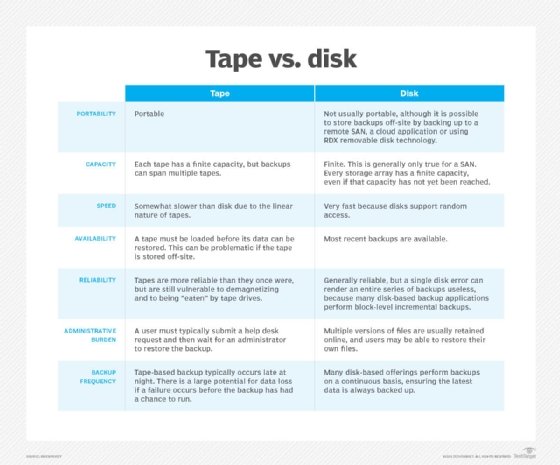
Tapes are relatively easy to move and transport compared with disk. Tapes and disks are both generally reliable, but many disk-based backup applications perform block-level incremental backups. This means a single disk error can render an entire series of backups useless.
However, there are benefits to disk over tape. Many disk-based products perform backups continuously throughout the day, while tape is backed up less frequently.
Tape backup security best practices
While tape enables some of the safest backups due to being offline, organizations can take additional measures to protect tape backups. Some ways to make data on tape more secure include the following:
Technical challenges with tape backup
There are hurdles to clear when using tape for backup. Potential challenges include the following:
- Tape rotation logistics.
- Ensuring adequate bandwidth between the data source and the tape drives.
- Scheduling tape drive maintenance.
- Capacity planning.
- Completing backups within a backup window.