The 7 critical backup strategy best practices to keep data safe
This comprehensive guide explains backup basics, the issues affecting risk and the seven critical backup strategies you need to keep data safe.
Although production storage is increasingly reliable and resilient, creating and maintaining a quality, independent copy of production data on a regular basis is more important than it has ever been. Especially with cloud backup in the mix, today's users and application owners expect no data loss, even in the event of a systems or facilities outage. And they expect recovery times that are measured in minutes, not hours. This puts enormous pressure on IT and storage administrators to create an effective backup strategy.
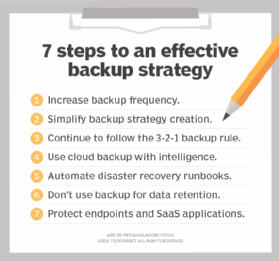
To help, here are seven best practices that can make creating that strategy easier.
1. Increase backup frequency
Because of ransomware, data centers must increase the frequency of backups -- once a night is no longer enough. All data sets should be protected multiple times per day. Technologies such as block level incremental (BLI) backups enable rapid backups of almost any data set in a matter of minutes because only the changed block, not even the whole file, is copied to backup storage. Organizations should consider some form of intelligent backup that enables rapid and frequent backups.
A close companion to block-level incremental backups is in-place recovery, sometimes called "instant recovery" by vendors. Although not truly instant, in-place recovery is rapid. It instantiates a virtual machine's data store on protected storage, enabling an application to be back online in a matter of minutes instead of waiting for data to be copied across the network to production storage. A key requirement of a successful in-place recovery technology is a higher-performing disk backup storage area since it serves as temporary storage.
An alternative to in-place recovery is streaming recovery. With streaming recovery, the virtual machine's volume is instantiated almost instantly as well, but on production storage instead of backup storage. Data is streamed to the production storage system, with priority given to data being accessed. The advantage of a streaming recovery over in-place recovery is that data is automatically sent to production storage, making the performance of the backup storage less of a concern.
This article is part of
What is cloud backup and how does it work?
2. Align backup strategy to service-level demands
Since the beginning of the data center, a best practice was to set priorities for each application in the environment. This best practice made sense when an organization might have two or three critical applications and maybe four to five "important" applications. Today, however, even small organizations have more than a dozen applications, and larger organizations can have more than 50. The time required to audit these applications and determine backup priorities simply doesn't exist. Also, the reality is that most of the application owners will insist on the fastest recovery times possible. Chargeback and showback techniques can help application owners reconsider more practical recovery times.
The capabilities provided by rapid recovery and BLI backup eases some of the pressure for IT to prioritize data and applications. They can quite literally put all data and applications in within a 30-minute to one-hour window, and then prioritize certain applications based on user response and demand. Settling on a default but aggressive recovery window for all applications is, thanks again to modern technology, affordable and more practical than performing a detailed audit of the environment. This is especially true in data centers where the number of applications requiring data protection is growing as rapidly as the data itself.
The recovery service level though, means that the organization needs to backup as frequently as the service level demands. If the service level is 15 minutes, then backups must be done at least every 15 minutes. Again, for BLI backups, a 15-minute window is reasonable. The only negative to a high number of BLI backups is that there is a limit in most software applications as to how many BLI backups can exist prior to them impacting backup and recovery performance. The organization might have to initiate twice-a-day consolidation jobs to lower the number of incremental jobs. Because the consolidation jobs occur off-production, they won't impact production performance.
The cost of BLI backups and in-place recovery is well within the reach of most IT budgets today. Many vendors offer free or community versions, which work well for very small organizations. The combination of BLI and rapid recovery, both of which are typically included in the base price of the backup application, is far less expensive than the typical high availability system, while providing almost as good recovery times.
Backup basics
When designing a modern backup strategy, reviewing the basics can be helpful. Here are a few.
Full, incremental and differential backups. Since the beginning of the data center there have been two types of backup: Full backup, which backs up the entire data set regardless of when the data was last changed, and incremental backup, which only backs up data changed since the prior backup, whether that was an incremental or a full backup.
As the data center moved from a single mainframe to a multi-vendor, open systems environment, it became difficult to manage multiple incremental backups. Differential backups were introduced to simplify backup data management but they did so at the cost of capacity efficiency. Differential backups back up all data since the last full backup. These are less capacity-efficient than incremental backups, but they offer a simpler restoration of data. Organizations especially turned to differential backups in the 1990s and early 2000s when the primary backup storage type was tape and tape libraries.
Image-based backups and BLIs. Image-based backup, which backs up changed data blocks instead of changed files, is becoming more popular. This is a much finer level of granularity than most types of incremental or differential backups. The proliferation of disk-based storage for backup data has driven the adoption of block level backups (BLI), a type of incremental backup. Image-based and block-based backups require a random-access device to perform their updates; tape is a sequential access medium. Image-based and block-based backups work by creating one full backup and then updating that full image on a user-defined, periodic basis (once a day to every 15 minutes, depending on data criticality).
New backup targets. Since the beginning of the data center through the early 2000s, the primary and in most cases only storage medium used for backup data was tape media and tape libraries. Disk-based backups, which made image-based backups a reality, also led to backup data being used for other use cases. These included testing and development and reporting, because modern backup software can quickly present data to those environments. Disk-based backup systems today are scale-out storage systems designed to scale to meet data growth and data retention demands.
The cloud vs. on-premises. Over the past eight years public cloud providers are quickly establishing themselves as an attractive alternative to on-premises disk-based backup technology. Using cloud storage, organizations can automatically have an off-site copy of data and limit the growth of on-premises backup storage systems. Also, with the data in the cloud, organizations can use cloud computing services for disaster recovery as well as for the testing and development and reporting use cases described above. Cost control is a key element to cloud storage -- organizations must pay for cloud storage each month and restoring data from cloud storage can incur substantial data egress costs.
3. Continue to follow the 3-2-1 backup rule
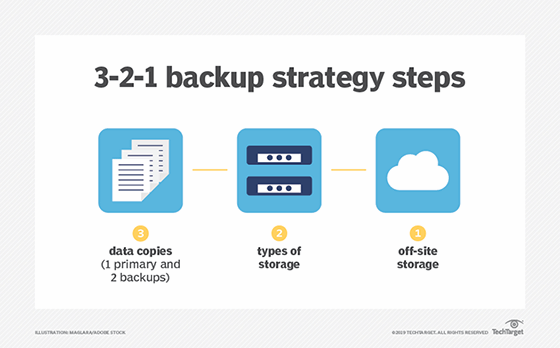
The 3-2-1 rule of backup states that organizations should keep three complete copies of their data, two of which are local but on different types of media, with at least one copy stored off site. An organization using the techniques described above should back up to a local on-premises backup storage system, copy that data to another on-premises backup storage system and then replicate that data to another location. In the modern data center, it is acceptable to count a set of storage snapshots as one of those three copies, even though it is on the primary storage system and dependent on the primary storage system's health. Alternatively, if the organization is replicating to a second location, it could replicate it once again to another location to meet the three copies requirement.
The requirement of two copies on two separate media types is more difficult for the modern data center to meet. In its purest form, two different media types literally mean two dissimilar media types, in other words a copy of data on disk and a copy on tape. The purest form of this rule still remains the most ideal practice but it is acceptable for organizations to consider a copy of data on cloud storage to be that second media type even though admittedly both copies are fundamentally on hard disk drives. Counting the cloud as a different media type is also strengthened if that cloud copy is immutable and can only be erased after a retention policy has passed. In other words, it can't be erased by a malicious attack.
4. Use cloud backup with intelligence
IT professionals should continue to demonstrate caution when moving data to the cloud. The need for caution is especially true in the case of backup data as the organization is essentially renting idle storage. Although the cloud backup provides an attractive upfront price point, long-term cloud costs can add up. Repeatedly paying for the same 100 TBs of data eventually becomes more expensive than owning 100 TB of storage. In addition, most cloud providers charge an egress fee for data moved from their cloud back to on premises, which is the case whenever a recovery occurs. These are just a few reasons why taking a strategic approach to choosing a cloud backup provider is so important.
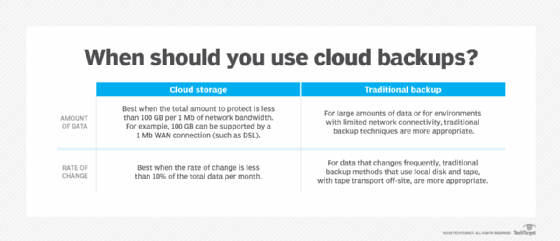
In light of its downsides, taking a strategic approach to the cloud is important. Smaller organizations rarely have the capacity demands that would make on-premises storage ownership less expensive than cloud backup. Storing all their data in the cloud is probably the best course of action. Medium to larger organizations might find that owning their storage is more cost-effective, but those organizations should also use the cloud to store the most recent copies of data and use cloud computing services for tasks such as disaster recovery, reporting, and testing and development.
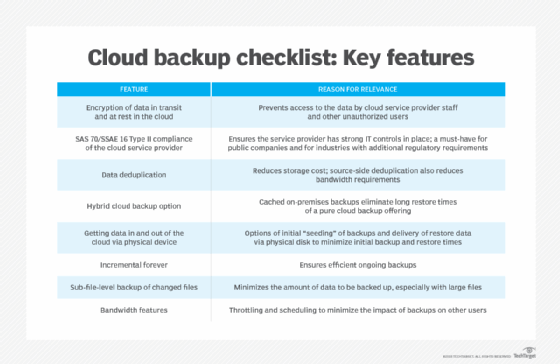
Cloud backup is also a key consideration for organizations looking to revamp their data protection and backup strategy. IT planners though, should be careful not to assume that all backup vendors support the cloud equally. Many legacy on-premises backup systems treat the cloud as a tape replacement, essentially copying 100% of the on-premises data to the cloud. Using the cloud for tape replacement does potentially reduce on-premises infrastructure costs, but it also effectively doubles the storage capacity that IT needs to manage.
Some vendors now support cloud storage as a tier, where old backup data is archived to the cloud, while more recent backups are stored on premises. Using the cloud in this way enables the organization to both meet rapid recovery requirements and to lower on-premises infrastructure costs.
Vendors are also using the cloud to provide disaster recovery capabilities, often referred to as disaster recovery as a service (DRaaS). This technique not only uses cloud storage but also cloud compute to host virtual images of recovered applications. DRaaS can potentially save the organization a significant amount of IT budget compared to having to manage and equip a secondary site on its own. DRaaS also facilitates easier and therefore more frequent testing of disaster recovery plans. It is without question one of the most practical uses of the cloud and an excellent way for organizations to start their cloud journey.
DRaaS is not magic, however. IT planners must ask vendors tough questions such as what is the exact time from DR declaration to the point that the application is usable. Many vendors claim, "push button" DR but that does not mean "instant" DR. Vendors that store backups in their proprietary format on cloud storage must still extract the data from that format. They also must, in most cases, convert their VM image from the format used by the on-premises hypervisor (typically VMware) to the format used by the cloud provider (typically a Linux-based hypervisor). All of these steps are manageable and IT or the vendor can automate them to a degree, but they do take time.
5. Automate disaster recovery runbooks
The most common recoveries are not disaster recoveries; they are recoveries of a single file or single application. Occasionally IT needs to recover from a failed storage system, but it is extremely rare that IT needs to recover from a full disaster where the entire data center is lost. Organizations, of course, still must plan for the possibility of this type of recovery. In a disaster, IT needs to recover dozens of applications and those applications can be dependent on other processes running on other servers. In many cases the other servers must become available in a very specific order, so timing of when each recovery can start is critical to success.
The combination of the infrequency of an actual disaster with the dependent order of server start up means that the disaster recovery process should be carefully documented and executed. The problem is that in today's stretched-too-thin data center these processes are seldom documented. They are updated even less frequently. Some backup vendors now offer runbook automation capabilities. These features enable the organization to preset the recovery order and execute the appropriate recovery process with a single click. Any organization with multi-tier applications with interdependent servers should seriously consider these capabilities to help ensure recovery when it is needed most.
Understand the issues affecting data backup
The expectations of what the backup copy can deliver have increased, and the factors influencing organizational backup needs have multiplied. Here's a look at a few of those.
Exponential data growth. The potential value of data encourages organizations to create more of it and to retain it for a longer period of time. The result is a massive production of data stores, and greater demand for protected storage and for backup applications that can provide insight as to what data is actually under protection. In addition, many organizations and potentially their current backup applications might not be prepared for the unprecedented growth of unstructured (file) data, a main cause of the rapid capacity demand increases. Many organizations now have file servers containing millions of files, creating a challenge for both image-based and file-by-file backup strategies.
Complex technology environments. Beyond the growth of data, organizations must also deal with a more complex technology ecosystem. For example, most organizations have seen an increase in the number of storage systems they use to support the organization, and each needs to be protected differently. Also, it is not uncommon for an organization to have bare metal systems and numerous hypervisor systems to protect. The diversity of storage systems and environments is an increased threat to backup quality, and the chances of getting it wrong are higher than ever.
Increased regulations. The value of data is not lost on governments and regulatory bodies. Organizations face an increasing number of regulations that specifically require data protection and data retention. Regulations such as the General Data Protection Regulation (GDPR) also require that organizations erase data when customers request it.
Growing ransomware threats. Backup is becoming increasingly related to incident response, thanks to cybercriminals. A major threat to data is the increasing number of cyberattacks, most notably ransomware. Ransomware packages infiltrate the organization, typically through a user endpoint, and then quickly propagate themselves across every server to which the user has access. The creators of malware are increasingly creative, waiting to trigger attacks for weeks so that the malware attaches to the backup data set and then once triggered, attacks backup applications first.
6. Don't use backup for data retention
Most organizations retain data within their backups for far too long. Most recoveries come from the most recent backup, not from a backup that is six months, let alone six years old. The more data contained within the backup infrastructure, the more difficult it is to manage and the more expensive it becomes.
A downside to most backup applications is that they store protected data in a proprietary format, and usually in a separate storage container for each backup job performed. The problem is that individual files can't be deleted from these containers. Regulations such as GDPR require organizations to retain and segregate specific data types. They also require, thanks to "right to be forgotten" policies, that organizations delete only certain components of customer data and continue to store other customer data. In addition, these deletions must be performed on-demand. Because deletion of data within a backup is an impossibility, the organization might need to take special steps to ensure that "forgotten" data is not accidentally restored.
The easiest way to meet this regulation is not to store data long term in the backup. Using an archive product for retaining data enables organizations to meet various regulations around data protection while also simplifying the backup architecture. Typically, archive systems are sold as a way to reduce the cost of primary storage, and while that it still true, their key value is helping organizations meet retention requirements. As a result, organizations can simply restore from backup jobs to the archive, which is an off-production process and provides file-by-file granularity.
7. Protect endpoints and SaaS applications
Endpoints -- laptops, desktops, tablets and smartphones -- all contain valuable data that might be uniquely stored on them. It is very reasonable to assume that data created on these devices might never be stored in a data center storage device unless they are specifically backed up, and that data will be lost if the endpoint has a failure, is lost or is stolen. The good news is that endpoint protection is more practical than ever thanks to the cloud. Modern endpoint backup systems enable endpoints to back up to a cloud repository, managed by core IT.
SaaS applications such as Office 365, Google G-Suite and Salesforce.com are even more overlooked by the organization. A general and incorrect assumption is that data on these platforms is automatically protected. The reality is that the user agreements for all of them make it very clear that data protection is the organization's responsibility. IT planners should look for a data protection application that can also protect the SaaS offerings that they use. Ideally, these offerings are integrated into their existing system, but IT could also consider SaaS-specific systems if they offer greater capabilities or value.
The backup process is under more pressure than ever. Expectations are for no downtime and no data loss. Fortunately, backup software can provide capabilities such as BLI backups, recovery in-place, cloud tiering, DRaaS and disaster recovery automation. These systems enable the organization to offer rapid recovery to a high number of applications without breaking the IT budget.