continuous data protection (CDP)

What is continuous data protection (CDP)?
Continuous data protection (CDP), also known as continuous backup, is a backup and recovery storage system in which all the data in an enterprise is backed up whenever any change is made. In effect, CDP creates an electronic journal of complete storage snapshots, one storage snapshot for every instant in time that data modification occurs.
CDP preserves a record of every transaction that takes place in the enterprise. In addition, if the system becomes infected with a virus or other malware such as ransomware, or if a file becomes mutilated or corrupted and the problem isn't discovered right away, it's always possible to recover the most recent clean copy of the affected file by essentially stepping back through the record of transactions to restore a file to a previous state or point in time.
A CDP backup system with disk storage offers almost real-time data recovery in a matter of seconds -- much less time than traditional tape-based backups or archives. CDP systems are a common addition to enterprise storage infrastructure. Installation of CDP hardware and programming is straightforward and doesn't put existing data at risk.
How does CDP work?
CDP was originally introduced as a mechanism to circumvent the problem of shrinking backup windows. Prior to the introduction of continuous data protection software, most organizations performed a regular system backup to disk or tape. The problem was many organizations found themselves having to protect a constantly growing data set in a strict backup window. Although there are several techniques for expediting tape backups, there's a limit to the amount of data that can be backed up in a given period.
This article is part of
What is data protection and why is it important?
Continuous data protection software sought to solve this problem by transitioning from full tape-based backup to partial, or only-what-has-changed, disk-based backup. This reliance on disk has the added benefits of overcoming tape capacity limitations and reducing the amount of time required for data restorations.
Continuous data protection technology works by creating an initial data copy to a protection server, usually residing in the organization's own data center, and then using changed block tracking to back up the storage blocks that have been modified -- or newly created -- since the previous backup -- also known as the delta or change. This approach minimizes the amount of data that must be backed up in each cycle and effectively eliminates the backup window. As such, backups occur every few minutes, as opposed to once per night.
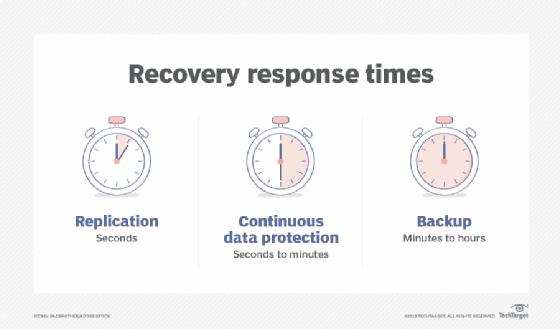
Although there are exceptions, most modern CDP platforms work by creating incremental forever backups. Once an initial full backup has been written to physical disk storage, there's no need to back up the data again. Instead, only modified or newly created storage blocks are backed up. This approach makes it easy to perform a bulk or granular recovery of data as it existed at a previous point in time. In actual practice, however, CDP backups are periodically reconciled to a new full backup. This prevents the chain of changes from becoming too long and risking corruption within the change records, which would effectively prevent proper restorations.
CDP systems can support any type of enterprise data, but are commonly used to protect the following:
- System files such as server operating systems and configurations.
- Application files or the programs that the enterprise uses.
- Application data or the information created and used by the applications.
- System management data such as server and platform logs and metrics collection.
- Database systems and files.
Data protection technologies, including CDP and more traditional backups, are designed to guard long-lived or business-critical data that might be needed for months or even years. CDP might not be well-suited to short-lived data types or use cases where data changes frequently, becomes obsolete quickly such as internet of things data, or carries little tangible business value such as machine learning training data sets. Thus, CDP is used where needed to protect specific valuable business applications and data assets with quick recovery.
To maintain business continuity, organizations must be able to create offsite backups. Although CDP servers generally reside in an organization's own data center, most can create secondary tape backups or replicate backups to the cloud or a backup data center. That way, if something were to happen to the organization's primary backup and recovery server, a secondary backup copy exists elsewhere that can be used for disaster recovery purposes.
What are the benefits and drawbacks of continuous data backup?
There are both advantages and disadvantages to using continuous data protection. In most cases, however, the advantages far outweigh the disadvantages.
Advantages
- CDP backups eliminate the need for a backup window.
- CDP backup servers are generally scalable and overcome the capacity limitations associated with tape-based backups.
- Unlike tape, disk isn't a linear medium, which often makes it possible to restore data more quickly than might be possible using a tape-based system.
- CDP systems enable point-in-time recoveries without needing to retrieve a tape from offsite storage.
- Many modern CDP platforms can perform instant recovery of virtual machines by running the VM directly on the backup server while a more traditional restoration occurs in the background.
- CDP supports effective file or data version control, allowing a business to roll back a file or data to a previous version or state as needed.
Disadvantages
- CDP platforms can be cost-prohibitive for smaller organizations. Storage can be a significant cost for CDP and the CDP software or subsystems can be expensive.
- If not properly architected, a CDP backup server can become a single point of failure -- such as corruption in the delta chain. CDP systems benefit from high-availability deployment techniques, but this also adds to the cost and complexity.
- CDP drives far more storage traffic, which can stress enterprise networks and storage subsystems.
How does near-CDP compare to true CDP?
The primary difference between CDP and near-continuous backup is the recovery point objective (RPO). True CDP systems guarantee that all newly created data is backed up. These systems, which tend to be designed for protecting structured data, are more demanding, costly and complex than near-continuous backup platforms. They're heavily used in financial services and other industries that must guarantee the protection of all data in real time.
When most people use the term continuous data protection, they're usually referring to near-continuous backup platforms. Rather than performing instantaneous backups as a true CDP platform does, near-continuous backup platforms perform block-level backups on a scheduled basis. The frequency of these scheduled backups varies based on the platform, but most have an RPO in the range of 30 seconds to 15 minutes.
Near-CDP is less demanding on network factors such as bandwidth and latency. Organizations can use near-CDP to protect far more workloads, but those workloads must be tolerant of some potential data loss. As with many IT systems, it's important for business and IT leaders to match the right technology to their business needs.
CDP vs. disk mirroring
A mirror backup, like any full backup, requires a lot of storage capacity. Disk mirroring, also known as RAID 1, fully replicates data to two or more disks in real time, so if one drive fails, the organization can use the redundant mirror copy immediately with no data loss. Before the advent of cloud storage, small and medium-sized businesses running only one server and a handful of laptops were less likely to implement CDP due to its cost and complexity.
CDP vs. traditional backup
CDP effectively solves the biggest challenges associated with traditional backups. Most notably, CDP eliminates the backup window. Whereas traditional backups often back up data at the file level, CDP is a block-level technology. As such, CDP immediately backs up any newly created or modified storage block data. This effectively eliminates the need for a nightly backup window.
CDP also helps address traditional backup challenges by reducing the RPO. A traditional nightly backup occurs once every 24 hours, and any data created since the most recent backup is potentially subject to loss. If an organization's nightly backup completes at midnight and there's a major data loss event at noon, then any data created between midnight and noon will be lost. In contrast, CDP platforms back up data almost immediately, meaning that an organization should never lose more than a few minutes' worth of data -- or none if the business implements true CDP.
CDP products
CDP products can range from on-premises software to dedicated appliances and even cloud-based service offerings. Examples of CDP-related vendors include the following:
- Acronis.
- Bacula Systems.
- Cloudian.
- Cohesity.
- DataCore Software.
- ManageEngine.
- NetApp.
- Rubrik.
- Veritas.
- Zerto.
This list is only intended to provide examples of providers of CDP products. It's important for CDP adopters to investigate and evaluate specific product features and functionalities before making any commitment to CDP technology.
Examine seven data archiving best practices that storage administrators should follow to ensure backup and retention policies protect an organization's data.