What is cloud backup and how does it work?
Cloud backup, also known as online backup or remote backup, is a strategy for sending a copy of a physical or virtual file or database to a secondary, off-site location for preservation in case of equipment failure, site catastrophe or human malfeasance. The backup server and data storage systems are usually hosted by a third-party cloud or SaaS provider that charges the backup customer a recurring fee based on storage space or capacity used, data transmission bandwidth, number of users, number of servers or number of times data is retrieved.
Implementing cloud data backup can help bolster an organization's data protection, business continuance and regulatory compliance strategies without increasing the workload of IT staff. The labor-saving benefit can be significant and enough of a consideration to offset some of the additional costs associated with cloud backup, such as data transmission charges.
Most cloud subscriptions run on a monthly or yearly basis. Initially used mainly by consumers and home offices, online backup services are now commonly used by SMBs and larger enterprises to back up some forms of data. For larger companies, cloud data backup can serve as a supplementary form of backup.
What is the cloud?
Cloud computing is a general term that refers to hosted resources and services that are delivered over the internet. Different from traditional web hosting, the services on the cloud are sold on demand, offered in an elastic manner -- meaning the customer can use as much or as little of the service as needed -- and managed completely by the service provider. Additionally, a cloud can be private or public. A public cloud sells services to anyone on the internet, such as how AWS operates, while a private cloud supplies hosted services to a limited number of users within the business.
Cloud backup use cases and approaches
In an organization's data center, a backup application copies data and stores it on different media or another storage system for easy access in the event of a recovery situation Although there are multiple options and approaches to off-site backup, cloud backup serves as the off-site facility for many organizations. In an enterprise, the company might own the off-site server if it hosts its own private cloud service, but the chargeback method would be similar if the company uses a service provider to manage the cloud backup environment and receives a regular bill for backup storage and services.
There are a variety of approaches to cloud backup, with available services that can easily fit into an organization's existing data protection process. Varieties of cloud backup include the following:
- Backing up directly to the public cloud. One way to store organizational workloads is by duplicating resources in the public cloud. This method entails writing data directly to cloud providers, such as AWS, Google Cloud or Microsoft Azure. The organization uses its own backup software to create the data copy to send to the cloud storage service. The cloud storage service then provides the destination and safekeeping for the data, but it doesn't specifically provide a backup application. In this scenario, it's important that the backup software is capable of interfacing with the cloud's storage service. Additionally, with public cloud options, IT professionals might need to look into supplemental data protection procedures, such as data encryption as well as identity and access management to secure backed up data.
- Backing up to a service provider. In this scenario, an organization writes data to a cloud service or SaaS provider that offers backup services in a managed data center. The backup software that the company uses to send its data to the service might be provided as part of the service, or the service might support specific commercially available backup applications.
- Choosing a cloud-to-cloud (C2C) backup. These services are among the newest offerings in the cloud backup arena. They specialize in backing up data that already lives in the cloud, either as data created using a SaaS application or as data stored in a cloud backup service. As its name suggests, a C2C backup service copies data from one cloud to another cloud. The cloud-to-cloud backup service typically hosts the software that handles this process.
- Using online cloud backup systems. There are also hardware alternatives that facilitate backing up data to a cloud backup service. These appliances are all-in-one backup machines that include backup software and disk capacity, along with the backup server. The appliances are about as close to plug-and-play as backup gets, and most of them also provide a seamless link to one or more cloud backup services or cloud providers. The list of vendors that offer backup appliances that include cloud interfaces is long, with Quantum, Unitrends, Arcserve, Rubrik, Cohesity, Dell EMC, StorageCraft and Asigra active in this arena. These appliances typically retain the most recent backup locally, in addition to copying it to the cloud backup provider, so any required recoveries can be made from the local backup copy, saving time and transmission costs.
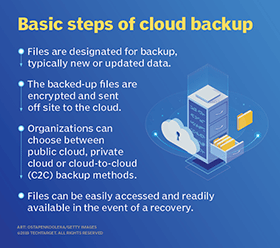
When an organization engages a cloud backup service, the first step is to complete a full backup of the data that must be protected. This initial backup can sometimes take days to finish uploading over a network as a result of the large volume of data being transferred. In a 3-2-1 backup strategy, where an organization has three copies of data on two different media, at least one copy of the backed up data should be sent to an off-site backup facility so that it's accessible even if on-site systems are unavailable.
Using a technique called cloud seeding, a cloud backup vendor sends a storage device -- such as a hard drive or tape cartridge -- to its new customer, which then backs up the data locally onto the device and returns it to the provider. This process removes the need to send the initial data over the network to the backup provider. One example of a device that employs this technique is AWS Snowball Edge.
If the amount of data in the initial backup is substantial, the cloud backup service might provide a full storage array for the seeding process. These arrays are typically small network-attached storage (NAS) devices that can be shipped back and forth relatively easily. After the initial seeding, only changed data is backed up over the network.
How data is restored
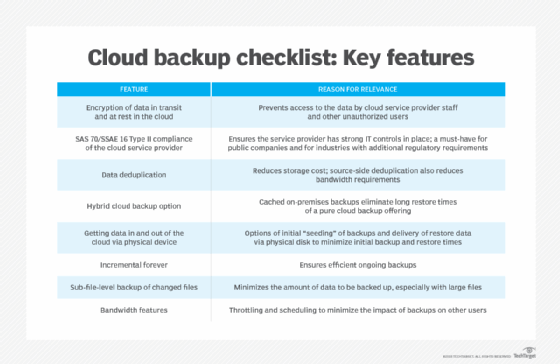
Cloud backup services are typically built around a client software application that runs on a schedule determined by the purchased level of service and the customer's requirements. For example, if the customer has contracted for daily backups, the application collects, compresses, encrypts and transfers data to the cloud service provider's servers every 24 hours. To reduce the amount of bandwidth consumed and the time it takes to transfer files, the service provider might only provide incremental backups after the initial full backup.
Cloud backup services often include the software and hardware necessary to protect an organization's data, including applications for Microsoft Exchange and SQL Server. Whether a customer uses its own backup application or the software the cloud backup service provides, the organization uses that same application to restore backed up data. Restorations could be on a file-by-file basis, by volume or a full restoration of the complete backup. More granular file-by-file restoration is typically the preferred method because it enables a business to quickly recover individual lost or damaged files rather than take the time and risk in restoring entire volumes.
If the volume of data to be restored is very large, the cloud backup service might ship the data on a complete storage array that the customer can hook up to its servers to recover its data. This is, in effect, a reverse seeding process. Restoring a large amount of data over a network can take an unacceptably long time, depending on the organization's recovery time objective (RTO).
A key feature of cloud backup restorations is that they can be done anywhere, from nearly any kind of computer. For example, an organization could recover its data directly to a disaster recovery site in a different location if its primary data center is unavailable.
Types of backup
In addition to the various approaches to cloud backup, there are also multiple backup methods to consider. Although cloud backup providers give customers the option to choose the backup method that best fits their needs and applications, it's important to understand the differences among the three main types.
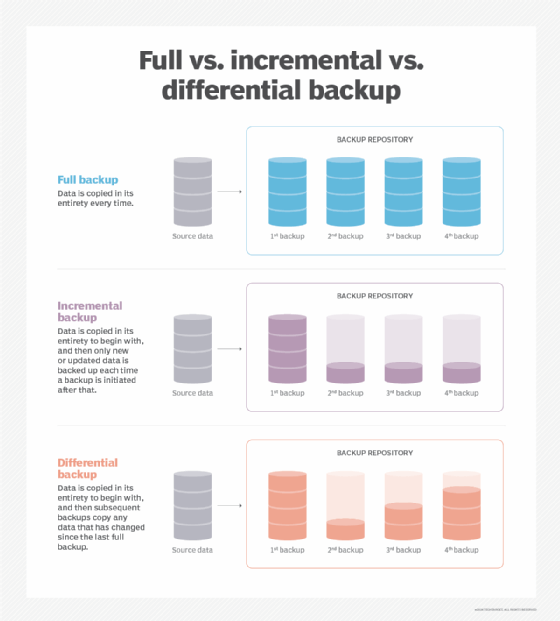
- Full backups copy the entire data set every time a backup is initiated. As a result, they provide the highest level of protection. However, most organizations can't perform full backups frequently because they can be time-consuming and take up too much data storage capacity.
- Incremental backups only back up the data that has been changed or updated since the last backup increment -- not the last full backup. This method saves time and storage space but can make it more difficult to perform a complete restore, because if any backup increment is lost or damaged, a full restore will be impossible. Incremental is a common form of cloud backup because it tends to use fewer resources.
- Differential backups are similar to incremental backups because they only contain data that has been altered. However, differential backups back up data that has changed since the last full backup, rather than the last backup in general. This method solves the problem of difficult restores that can arise with incremental backups.
Pros and cons
Before choosing cloud backup as a backup strategy, weigh the potential pros and cons that are associated with using a third party to store data. The advantages of cloud backup include the following:
- Generally, it's cheaper to back up data using a cloud backup service compared to building and maintaining an in-house backup operation. The associated cloud backup costs will rise as the volume of backup data rises, but the economics are likely to continue to make cloud backup an attractive choice. Some providers might offer free cloud backup, but the amount of backup capacity typically has a storage limit, which makes free backup appropriate for some home users and only the smallest of companies.
- The cloud is scalable, so even as a company's data grows, it can still be easily backed up to a cloud backup service. But organizations need to be wary of escalating costs as data volume grows. By weeding out dormant data and sending it to an archive, a company can better manage the amount -- and cost -- of data it backs up to the cloud.
- Managing cloud backups is simpler because service providers take care of many of the management tasks that are required with other forms of backup.
- Backups are generally more secure against ransomware attacks because they are performed outside of the office network. Backup data is typically encrypted before it's transmitted from the customer's site to the cloud backup service, and it usually remains encrypted on the service's storage systems.
- Cloud storage is typically resilient and redundant, so backups help lower the risk of common data backup failures caused by improper storage, physical media damage or accidental overwrites.
- A cloud backup service can help to consolidate a company's backup data because the service can back up main data center storage systems, remote office servers and storage devices, and end-user devices such as laptops and tablets.
- Backed up data is accessible from anywhere.
Despite its many benefits, there are some disadvantages and challenges to using a cloud backup service, including the following:
- The backup speed depends on bandwidth and latency. For example, when many organizations are using the internet connection, the backup could be slower. This could be bothersome when backing data up but could be an even greater issue when it's necessary to recover data from the service. Anything that slows a recovery can jeopardize an established RTO.
- Costs can escalate when backing up large amounts of data to the cloud. This is due to recurring storage costs over time, as well as spiraling storage volumes needed to host evermore backups. Storage management and data retention policies are vitally important for any cloud storage initiatives, including backups.
- As with any use of cloud storage, data is moved outside of an organization's buildings and equipment and into the control of an outside provider. Therefore, it's incumbent to learn as much as possible about the cloud backup provider's equipment, physical security procedures, data protection process and fiscal viability. Cloud users bear the responsibility to encrypt and control access to stored data at all times.
Best practices
Although strategies, technologies and providers widely vary, there are several agreed-upon best practices when it comes to implementing cloud backup in the enterprise. Here are a few guidelines:
- Understand all aspects of the cloud backup provider service-level agreement (cloud SLA), such as how data is backed up and protected, where vendor offices are located and how costs accumulate over time. Know the limits of a provider's responsibility and how to seek support and remediation if necessary.
- Don't rely on any one method or data storage medium for backup. The 3-2-1 backup methodology remains a central policy for enterprise backups.
- Test backup strategies and data recovery checklists to ensure they are sufficient in case of a disaster. Validate backups and periodically test recovery processes to ensure that technologies and staff skill sets are sufficient to recover if necessary.
- Have administrators routinely monitor cloud backups to make sure processes are successful and uncorrupted.
- Choose a data restore destination that is easily accessible and doesn't overwrite existing data.
- Make decisions about specific data or files to back up based on the criticality of the information to business operations -- all data isn't created equal, so implement backups that reflect the importance and value of varied business data types.
- Use metadata properly to enable the quick location and restoration of specific files.
- Consider using private encryption for data that must stay confidential.
- Use data retention policies and data management techniques to ensure that only necessary data is backed up -- especially in the cloud, where recurring costs accumulate.
Special considerations
When choosing a cloud backup service provider, there are a few additional considerations to weigh. Some companies have special needs related to data protection, but not all cloud backup providers are able to meet those needs. For example, if a company must comply with a specific regulation such as HIPAA or GDPR, the cloud backup service needs to be certified as compliant with data handling procedures as defined by that regulation. Although an outside firm provides the backup, the customer is still responsible for the data and could face serious consequences -- including steep fines and litigation -- if the cloud backup provider doesn't maintain the data appropriately.
Data archiving is another special consideration when selecting a cloud backup service. Archiving is different from routine data backup. Archived data is data that isn't currently needed but still needs to be retained. Ideally, that data should be removed from the daily backup stream because it's likely unchanged, and it unnecessarily increases the volume of backup data transmissions. Some cloud backup providers offer archiving services to complement their backup products. Archive data is generally stored on equipment geared for longer retentions and infrequent access, such as tape or low-performing disk systems. Archival storage, such as Amazon S3 Glacier or Azure Archive Storage, is generally less expensive than data storage used for active backups.
Cloud vs. local backup
When looking into data backup options, two main product categories are cloud backup and local backup. Local backup, also known as traditional backup, is the process of storing a copy of data on site at the organization. In this approach, backup software is used to manage, copy and restore the data to backup targets such as tapes, disks or network-attached storage devices.
In the enterprise, cloud data backup services were initially used for noncritical data. Traditional backup was considered better for critical data that requires a short RTO because there are physical limits as to how much data can be moved in a given amount of time over a network. When a large amount of data needs to be recovered, it might need to be shipped on tape or some other portable storage media.
However, with most cloud backup schemes -- whether controlled by a user's backup software, the cloud backup service app or a backup appliance -- the most recently backed up data is retained on site, as well as spun off to the cloud service. This arrangement provides all the benefits of cloud backup, while leaving a local copy of the data that can be used for quick recoveries.
Tape backup requires data to be copied from a primary storage device to a tape cartridge. Cartridges have grown dramatically in capacity in recent years. LTO-8 tapes, released in late 2017, can store 12 TB of uncompressed data and 30 TB of compressed data. Subsequent LTO tape standards include LTO-9 with 18 TB of capacity (45 TB compressed), LTO-10 with 36 TB (90 TB compressed), LTO-11 with 72 TB (180 TB compressed) and LTO-12 with 144 TB (360 TB compressed).
Tape is a strong and easily transported storage medium in an age of exponential data growth. In addition to their capacity benefits, tapes are comparatively inexpensive to own and operate. However, the restore process can be slow because access is sequential.
Although the cloud appears to offer unlimited storage capacity, costs rise dramatically depending on how much an organization needs. Although access isn't sequential like with tape, restore times still depend on the internet or private communications lines and require an appropriate amount of bandwidth.
Cloud service providers take some of the backup management work out of the process for organizations. The process of backing up to tape and maintaining the cartridges is essentially up to the organization. There is more flexibility in the process of restoring from cloud backup because an organization can restore to several different devices, including laptops and phones.
Cloud and tape both provide protection from cyber attacks, including ransomware. Cloud backups are useful in the event of an attack because they are off-site. Tape backups are even more secure because they are offline.
Disk, while not as portable as tape, is another common medium for backup. The biggest benefit to a disk is access speed. Disks offer random access and often top cloud and tape for restore speed. Disk-based backups are typically performed continuously throughout the day, while tape backs up less regularly. A disk-based backup is self-contained, with less personnel interaction than with tape, making the risk of human error smaller. Disk-based backups can be expensive, though -- often costlier than tape or cloud. The lifespan of disk is shorter than tape, and its durability is weaker than that of tape. As long as the service provider is still in business, the lifespan of a cloud backup could be longer than that of disk or tape.
NAS backup relies on a disk-based NAS appliance that connects to a network, rather than a desktop or server, to accomplish a local backup. These appliances allow multiple devices and users on the same network to store, access and share data wirelessly. Both NAS and cloud backup offer strong data protection, high security and efficient recovery times, but since NAS appliances are located on the same LAN as the devices being backed up, NAS backups are quicker to perform than cloud backups. However, cloud backups can provide a lower initial cost and a higher reliability in the case of on-site disasters.
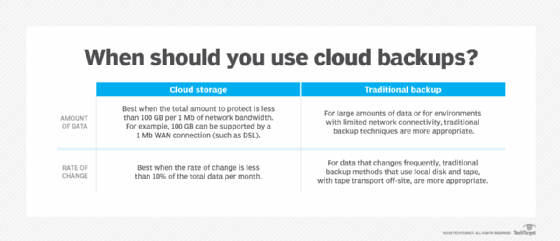
The following chart helps to illustrate when cloud data backups should be considered as a viable option.
With a proper retention policy, cloud backups can reduce or even replace the need for off-site tape data storage, so organizations are making the switch from disk-to-disk-to-tape (D2D2T) strategies to disk-to-disk-to-cloud (D2D2C).
Flexibility is another benefit of the cloud because no additional storage hardware is needed.
Cloud backup vs. cloud DR
Cloud backup and cloud disaster recovery aren't the same, but they are connected. Although cloud backup services can be tapped to recover data and resume operations after a disruptive event, it should be noted that they aren't necessarily specifically oriented to provide all the advanced features and services that a true DRaaS offering would provide.
The real difference between a backup and a DR environment is "content." For example, in order to use the data saved to a cloud backup service to recover from a disaster, the backup content would have to include much more than just data files; OSes, application software, drivers and utilities are also required. Users would have to set up their backup routines to include those elements specifically, such as by mirroring entire servers to the cloud backup service.
More importantly, a true DRaaS not only has the data and the system and application software ready to be accessed; it also provides the necessary servers -- physical or virtual -- and storage resources to spin up the clients' servers and applications so that they continue to operate and carry on with their business.
An organization must consider whether the disaster recovery provider has enough bandwidth and resources to handle the data transfer and, thus, how long it will take to perform a recovery. Cloud DR testing is important and often easier than traditional DR testing because many providers offer automated tests.
A cloud backup provider might also offer disaster recovery in the cloud. Cloud disaster recovery is particularly attractive for smaller businesses that don't have the funding or resources to support their own DR site. The cloud data center should be far enough away from the organization using it to ensure recovery from any local or regional disaster.
File sync and share
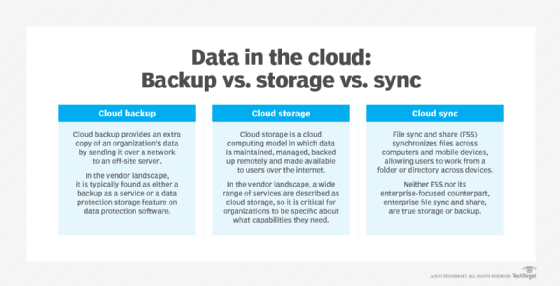
There is often confusion among the definitions of cloud backup, cloud storage and cloud sync, often referred to as file sync and share (FSS). There are similarities among the three, but they are different processes.
FSS services allow users to create folders online where they can store and access files stored on personal computers and servers. As the name implies, these services can automatically update files to their latest versions, whether stored locally or online. They also make collaboration and file sharing with colleagues or clients easy. Cloud sync providers include Box, Dropbox, Google Drive and Microsoft OneDrive.
Some companies rely on FSS services to back up their data as well. Although this approach might be acceptable for a small amount of data, it's not appropriate for large data volumes or a company's critical data, as these services tend to lack the types of content and retention management and version control features that cloud backup offers. Also, given their user-oriented approach to data handling, data can become vulnerable if mishandled by sync and share participants.
Cloud backup vs. cloud storage
Although they share similarities, cloud backup and cloud storage aren't the same thing. Cloud storage is a service model in which data is stored on remote systems. Data in cloud storage is available to users over a network, typically the internet. Benefits of cloud storage include global availability, ease of use and off-site security. Potential drawbacks range from performance issues depending on network connection, to loss of complete control over the data, to escalating costs over time.
There are three main types of cloud storage: public, private and hybrid. Public cloud data is stored in the service provider's data center. Customers pay based on several factors, including frequency and volume of data accessed. The top three public cloud storage providers are Amazon, Google and Microsoft. Private cloud storage is typically implemented through in-house storage protected behind an organization's firewall. Private cloud users often need more customization and control over their data. A hybrid cloud storage model is a mix of public and private cloud storage.
As cloud backup is a service that sends an extra copy of an organization's data over a network to an off-site server, the typical user shouldn't need to access that data on a regular basis. Cloud storage, though, is for more regular use. Ultimately, the difference between storage and backup isn't "content" but the purpose for which that content is intended.
Cloud storage itself should have backup. For example, an organization could back up data it has in AWS or Microsoft Azure with the provider's native backup or use a third-party tool. However, it's worth noting that cloud storage often implements high levels of resilience and redundancy by design, so take the time to compare the provider's storage SLA reliability commitments against the organization's retention requirements. Creating a cloud backup of cloud storage can be an unneeded expense for some types of low-priority data.
Archiving -- through purpose-built cloud archive storage services, for example -- is a good use case for cold cloud storage, but only up to a point. The infrequently accessed tier of cloud storage provides a comparatively cheaper cost to store data that an organization must keep but doesn't need to regularly access. However, organizations should tread carefully here, because costs add up as volumes rise and the price to get data out is high. In some cases, aging data can actually be removed from the cloud and stored back on local storage systems, and archiving can be a particularly attractive use case for tape storage.
Hybrid cloud backup
Hybrid cloud backup providers connect traditional local or private cloud backups to the public cloud. A hybrid cloud backup strategy is useful for organizations that produce a large volume of data and need quick restore access.
With one approach, a NAS appliance serves as a local backup target and syncs backup data to the cloud. When an organization needs a quick restore, the data is available in the on-site NAS. If an organization loses its primary site, the cloud backup is still available, protecting against data loss. This method can also be referred to as D2D2C backup. In another hybrid approach, an organization uses both the public and private cloud for backup.
It's difficult to get data consistency with hybrid cloud backup, especially if the data transfer takes a long time. Consequently, backup synchronization and data validation are critical parts of a hybrid -- or any multitarget -- backup strategy. Point-in-time snapshots and continuous backups help, but costs rise as backup frequency increases.
Comparatively, in a pure cloud backup scenario, backups go directly to the service provider's cloud.
Cost
Third-party cloud backup initially gained popularity with SMBs and home users because of its convenience. Today, cloud backup services have become more sophisticated and can offer the same level of data protection as in-house enterprise data backup, if not greater.
Cloud backup technology has an initial upfront cost and effort to implement, but its lower recurring monthly or yearly payment plans appeal to many smaller operations. Capital expenditures for additional hardware aren't required, and backups can be run dark. However, the cost of keeping data in the cloud for years does add up. In addition, costs rise as the amount of data backed up to the cloud increases. A system of effective data retention/deletion and archiving can help keep cloud backup storage costs down.
In terms of return on investment, consider the long-term costs of backing up to the cloud. A five-year projection is recommended to properly estimate future expenses and to decide whether the cloud will help an organization break even after initial costs. After these costs are offset, ROI on cloud-based backups can be determined. Estimates require a careful analysis of future storage growth and retention demands over the same time period.
Pricing models vary by vendor, but it's important to look out for hidden costs in cloud backup services. Although most products for backing up to the cloud are sold using a price-per-gigabyte-per-month payment model, providers can also use a sliding scale model, set usage minimums and add transaction costs. It might be possible to reduce backup and archival cloud storage costs by investigating price reductions for long-term service commitments. A well-versed cloud FinOps team can also help identify and manage cloud costs for backup and archival storage initiatives.
Security
Security is an important element in the cloud backup process. The three main considerations are often referred to as the security CIA: confidentiality, integrity and availability.
Most data will move across the public internet on its way to the cloud, so for confidentiality, many cloud backup providers encrypt data throughout the process: at the original location, during transit and at rest in the provider's data center. A user or the provider holds the encryption key. Most organizations prefer to hold their encryption keys, and providers should offer this option. Types of network encryption include Secure Sockets Layer (SSL) and Transport Layer Security protocols.
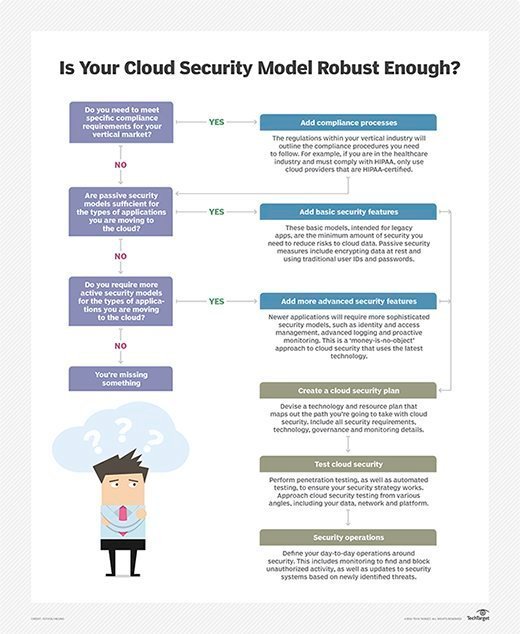
For integrity, users must determine whether data is the same when it's read back or whether it was corrupted. Object storage offers built-in integrity checks -- a form of validation that is typically conducted as the backup is created.
Availability takes the restoration process into account. It asks: Will data be available in a timely fashion in a disaster recovery situation? Availability is often the most overlooked and underappreciated aspect of cloud backups. Users assume that a cloud is always available from anywhere, but cloud providers do experience service disruptions that can range anywhere from several minutes to several hours. An enterprise must determine whether the provider's availability is adequate for cloud backup needs.
Access control is also important. An organization tightens security by limiting access to cloud backups. Furthermore, write-once, read-only access protects backup data from being overwritten, altered or deleted.
Cloud backups can help an organization guard against malicious attacks such as malware. The idea is simple: When an attack strikes, simply invoke a restoration to return the affected systems to an uninfected state. However, malware is frequently designed to replicate and hide on different systems. Simple restoration doesn't guarantee that all instances of the malware are removed, since restoring a server doesn't necessarily restore a user's infected endpoint. Administrators must execute thorough malware testing and eradication during restoration. Similarly, undetected malware infection can easily be present in backups, resulting in problematic restoration, so organizations require comprehensive malware protection regimens before backups are ever created.
Vendor options
Approaches to online backup services vary, so an organization should take a close look at SLAs, pricing plans and long-term costs before choosing a provider. Examples of cloud data backup vendor options include the following:
- Acronis. This vendor offers Cyber Backup, a hybrid cloud backup-as-a-service product. Acronis Cyber Backup protects virtual, physical and cloud environments, and it includes a pay-as-you-go business model.
- Arcserve. With its purchase of Zetta, Arcserve expanded its Unified Data Protection (UDP) offering. The product includes Arcserve UDP Cloud Direct direct-to-cloud DR and backup. The cloud protection is targeted at the midmarket.
- Asigra. A cloud backup pioneer, Asigra's Cloud Backup features embedded malware engines to prevent ransomware from getting into backups.
- Backblaze. This vendor offers personal and business cloud backup, as well as cloud storage. Backblaze stores data on its open source Storage Pods hardware platform and cloud-based Backblaze Vault file system. Backup data through Backblaze is accessible through a web browser on mobile devices and computers. Restores are downloaded over SSLs.
- Carbonite. Selling to consumers, SMBs and enterprises, the company's offerings back up documents, email, music, photos and settings and are available for Windows and Mac users. In March 2018, Carbonite acquired rival Mozy from Dell EMC and incorporated its services into its offerings. In 2019, Carbonite bought cybersecurity vendor Webroot. Later in 2019, content management vendor OpenText acquired Carbonite.
- CrashPlan. This vendor offers small business and enterprise backup options. It supports full drive backups to local drives and protects Linux and macOS networked drives.
- Druva. This cloud backup vendor features three major offerings. The enterprise-level Druva inSync is targeted at endpoints and backs up data across physical and public cloud storage, while Druva for Hybrid Workloads is a software agent used to back up and restore data sets in the cloud for distributed physical and virtual servers. In addition, in 2018, Druva acquired CloudRanger for AWS data protection.
- IDrive. Geared toward consumers and small businesses, IDrive includes snapshots, a syncing service and hybrid data protection.
- Microsoft Azure Backup. This service automatically sends backups to the Azure cloud. Azure Site Recovery automates replication to back up private Windows infrastructure.
- Rubrik. Specializing in strong security and rapid recovery, Rubrik offers a cloud data management platform that supports hybrid and multi-cloud environments.
- SpiderOak One Backup. This SMB hybrid cloud backup offering protects an unlimited number of devices -- including external devices -- and offers a 5 TB storage limit.
- Unitrends. This vendor enables customers to back up indefinitely to its private cloud with Forever Cloud and offers several DRaaS options for recovery.
- Veeam Software. Veeam provides cloud backup through its Cloud Connect product. Service providers can partner with Veeam to create a backup and recovery target in the cloud.
- Veritas NetBackup. Veritas provides unified data protection for physical, virtual and multi-cloud environments that can be managed from a single pane of glass.